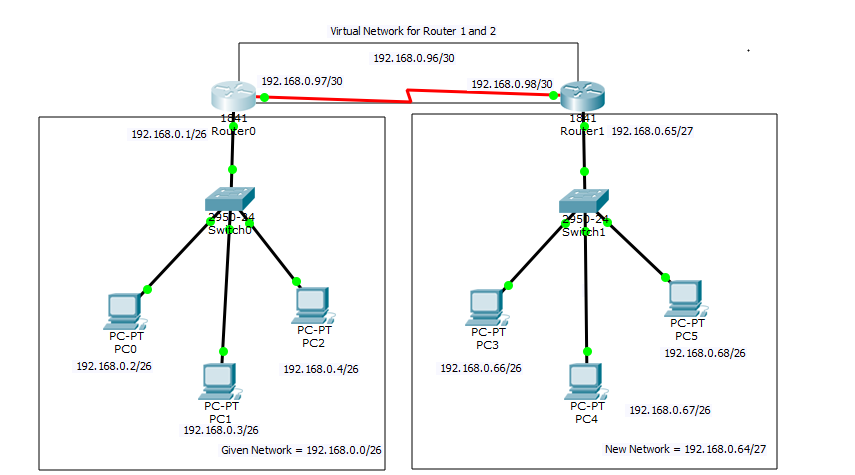
Given Network = 192.168.0.0
Required hosts for Router 1 = 60
Required hosts for Router 2 = 30
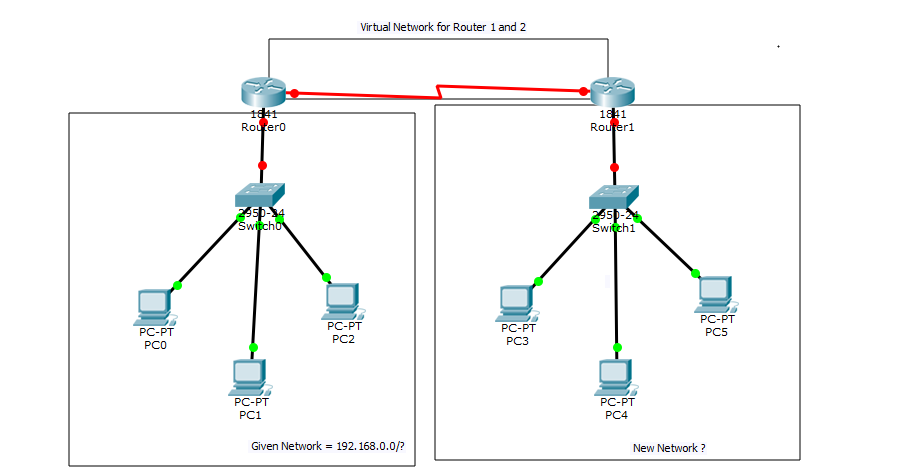
Router 1 >= 60 hosts
60 >= 2n – 2
60 >= 26 – 2
60 >= 64 – 2
60 >= 62
Total number of network bits = 32
32 – n = 32 – 6 = 26 (CIDR of Router 1 network i.e Given network )
i.e 192.168.0.0/26
N.S.M = 11111111.11111111.11111111.11000000
= 255.255.255.192
Block Size = 256 – N.S.M
= 256 – 192 = 64
Note: Add this block size in given network so that we can get our new network for Router 2.
so the new network is 192.168.0.64/?
Now find FVH, LVH and Broadcast address
Given network 192 .168 .0 .0
FVH 192 .168 .0 .1
LVH 192 .168 .0 .62
Broadcas 192 .168 .0 .63
New network 192 .168 .0 .64
Router 2 >= 30 hosts
30 >= 2n – 2
30 >= 25 – 2
30 >= 32 – 2
30 >= 30
Total number of network bits = 32
32 – n = 32 – 5 = 27 (CIDR of Router 2 network i.e New network )
i.e 192.168.0.64/27
N.S.M = 11111111.11111111.11111111.11100000
= 255.255.255.224
Block Size = 256 – N.S.M
= 256 – 224 = 32
Note: Add this block size in given network so that we can get our new network for Router 1 and 2 (Virtual Network).
so the new network is 192.168.0.96/?
Now find FVH, LVH and Broadcast address
Given network 192 .168 .0 .64
FVH 192 .168 .0 .65
LVH 192 .168 .0 .94
Broadcas 192 .168 .0 .95
New network 192 .168 .0 .96
Router 1 & 2 >= 2 hosts (we required only two ip to connect 2 routers)
2 >= 2n – 2
2 >= 22 – 2
2 >= 4 – 2
2 >= 2
Total number of network bits = 32
32 – n = 32 – 2 = 30 (CIDR of Virtrual network (R1&R2))
i.e 192.168.0.96/30
N.S.M = 11111111.11111111.11111111.11111100
= 255.255.255.252
Block Size = 256 – N.S.M
= 256 – 252 = 4
Note: Add this block size in given network so that we can get our new network for Router 3. This network can be used in future.
so the new network is 192.168.0.100/?
Now find FVH, LVH and Broadcast address
Given network 192 .168 .0 .96
FVH 192 .168 .0 .97
LVH 192 .168 .0 .98
Broadcas 192 .168 .0 .99
New network 192 .168 .0 .100
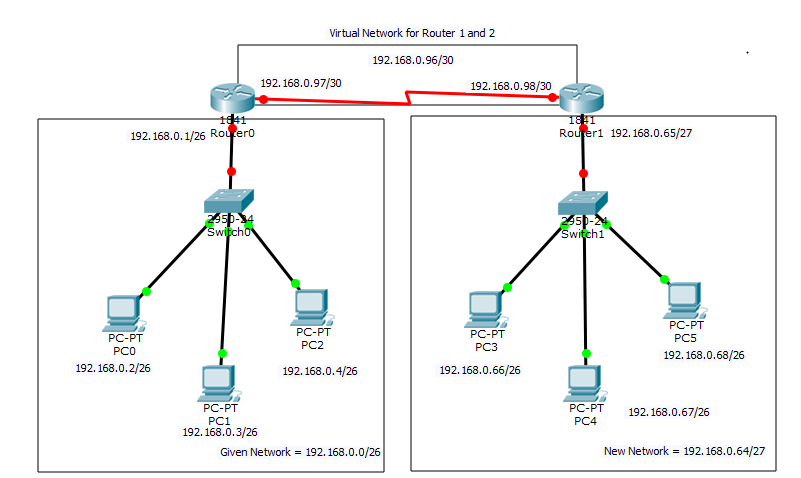
Basic Configuration on Router 1
— System Configuration Dialog —
Continue with configuration dialog? [yes/no]: no
Press RETURN to get started!
Router>enable
Router#configure terminal
Router(config)#hostname R1
R1(config)#interface fastEthernet 0/0
R1(config-if)#ip address 192.168.0.1 255.255.255.192
R1(config-if)#no shutdown
R1(config-if)#exit
R1(config)#interface serial 0/0/0
R1(config-if)#ip address 192.168.0.97 255.255.255.252
R1(config-if)#clock rate 64000
R1(config-if)#no shutdown
R1(config-if)#exit
R1(config)#exit
R1#write
Basic Configuration on Router 2
— System Configuration Dialog —
Continue with configuration dialog? [yes/no]: no
Press RETURN to get started!
Router>enable
Router#conf
Router#configure terminal
Router(config)#hostname R2
R2(config)#interface fastEthernet 0/0
R2(config-if)#ip address 192.168.0.65 255.255.255.224
R2(config-if)#no shutdown
R2(config-if)#exit
R2(config)#interface serial 0/1/0
R2(config-if)#ip address 192.168.0.98 255.255.255.252
R2(config-if)#no shutdown
R2(config-if)#exit
R2(config)#exit
R2#write
Static Configuration on Router 1
R1#configure terminal
R1(config)#ip route 192.168.0.64 255.255.255.224 192.168.0.98
R1(config)#exit
R1#write
Static Configuration on Router 2
R2#configure terminal
R2(config)#ip route 192.168.0.0 255.255.255.192 192.168.0.97
R2(config)#exit
R2#write
Verification on Router 1
R1#show ip route
Codes: C – connected, S – static, I – IGRP, R – RIP, M – mobile, B – BGP
D – EIGRP, EX – EIGRP external, O – OSPF, IA – OSPF inter area
N1 – OSPF NSSA external type 1, N2 – OSPF NSSA external type 2
E1 – OSPF external type 1, E2 – OSPF external type 2, E – EGP
i – IS-IS, L1 – IS-IS level-1, L2 – IS-IS level-2, ia – IS-IS inter area
* – candidate default, U – per-user static route, o – ODR
P – periodic downloaded static route
Gateway of last resort is not set
192.168.0.0/24 is variably subnetted, 3 subnets, 3 masks
C 192.168.0.0/26 is directly connected, FastEthernet0/0
S 192.168.0.64/27 [1/0] via 192.168.0.98
C 192.168.0.96/30 is directly connected, Serial0/0/0
Verification on Router 2
R2#show ip route
Codes: C – connected, S – static, I – IGRP, R – RIP, M – mobile, B – BGP
D – EIGRP, EX – EIGRP external, O – OSPF, IA – OSPF inter area
N1 – OSPF NSSA external type 1, N2 – OSPF NSSA external type 2
E1 – OSPF external type 1, E2 – OSPF external type 2, E – EGP
i – IS-IS, L1 – IS-IS level-1, L2 – IS-IS level-2, ia – IS-IS inter area
* – candidate default, U – per-user static route, o – ODR
P – periodic downloaded static route
Gateway of last resort is not set
192.168.0.0/24 is variably subnetted, 3 subnets, 3 masks
S 192.168.0.0/26 [1/0] via 192.168.0.97
C 192.168.0.64/27 is directly connected, FastEthernet0/0
C 192.168.0.96/30 is directly connected, Serial0/1/0